
IP Camera Instead of a Handheld Scanner: Barcode and Date Code Inspection on Every Box
A bakery checks the ITF-14 barcode and date code on 1,700 boxes a day with 99.9% accuracy and stops the line on any mismatch
Summary
Client. A producer of bread and baked goods.
Task. Set up automatic barcode and date code inspection on every box and stop the conveyor if a label is wrong or unreadable.
Result. CamContador inspects the labels on 1,700 boxes a day with 99.9% accuracy. Barcode and date errors are corrected at the plant, before the goods ship to retail chains.
Situation
The plant packs its finished products into corrugated boxes and ships them to retail chains. Each box carries a label with the production date and an ITF-14 barcode, the format used on outer cases. Retailers rely on the barcode and date when they receive goods at the distribution centre and in store.
An employee on the production floor used to check the labels before shipment, reading the barcode with a handheld scanner and comparing the date by eye. If a code would not scan, the line was stopped and the labels were reprinted.
Hundreds of boxes passed through the inspector’s hands, and the work was monotonous and tiring. Attention naturally dips towards the end of a shift, and anything can break it: a message on a phone, a word from a colleague. Under those conditions, it was easy to miss a label with a poorly printed barcode or a wrong date.
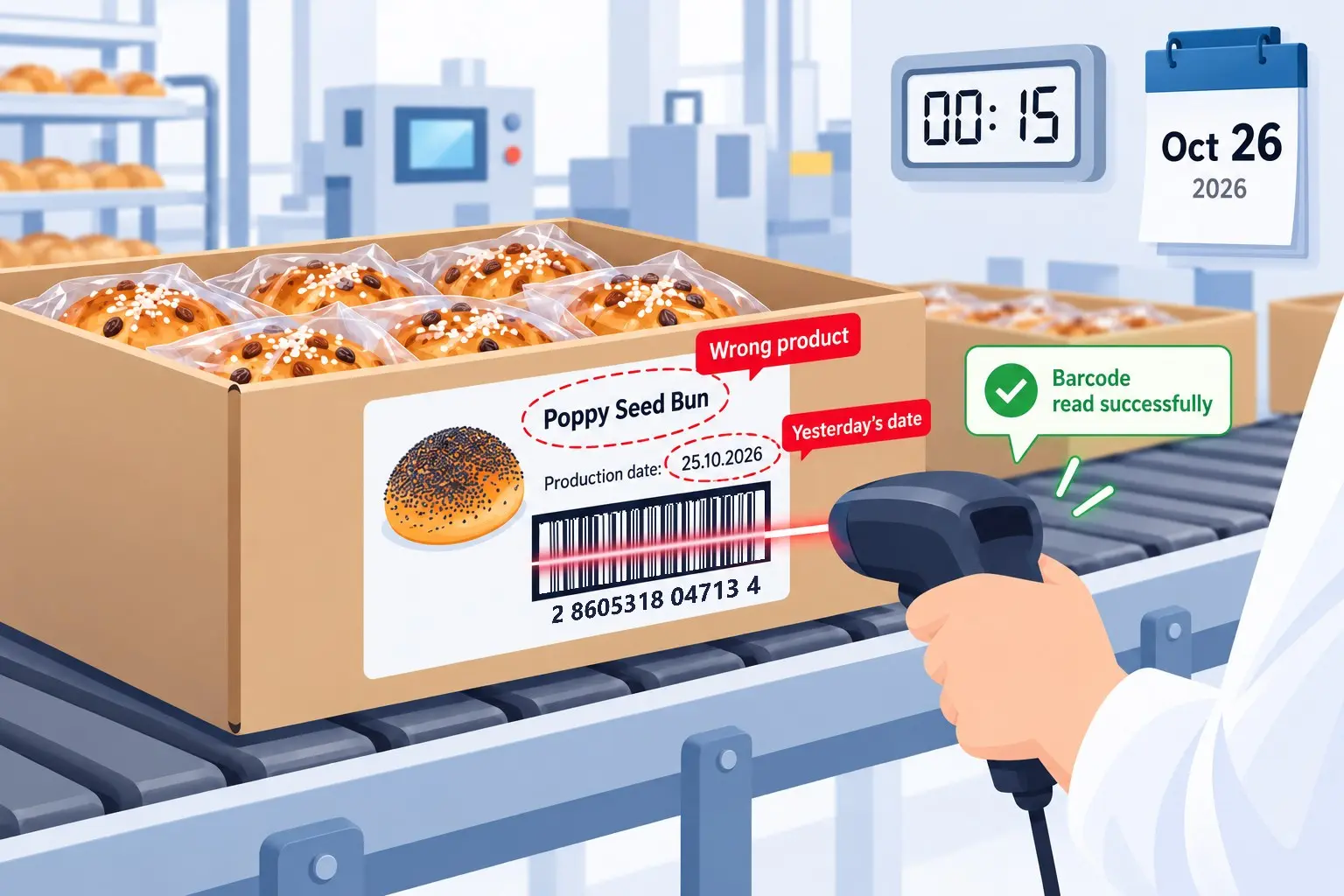
Some errors are invisible to a handheld scanner. After a product changeover, the printer may keep printing the previous product’s barcode, and after midnight it may keep printing yesterday’s date. The scanner reads that barcode without complaint, because the code is genuine. It just belongs to a different product.
Boxes with unreadable or wrong labels come to light when the retail chain receives them. The batch can be sent back, and the plant can face a claim.
Challenge
The client asked us to replace the manual check with automatic label inspection on the line. The system had to read the barcode and date on every box from the camera feed, compare them with the expected values and stop the conveyor immediately on an error. The operator enters those values in the program at the start of a shift and at each product changeover. From then on, the system runs without operator involvement.
Solution
About half of our projects involve counting products on a conveyor, but clients often come to us with quality control tasks as well: the system finds a defect, then alerts staff or stops the line itself. We covered three such projects in our article on product quality control in manufacturing. This project is also about inspection, with the label as the thing being checked.
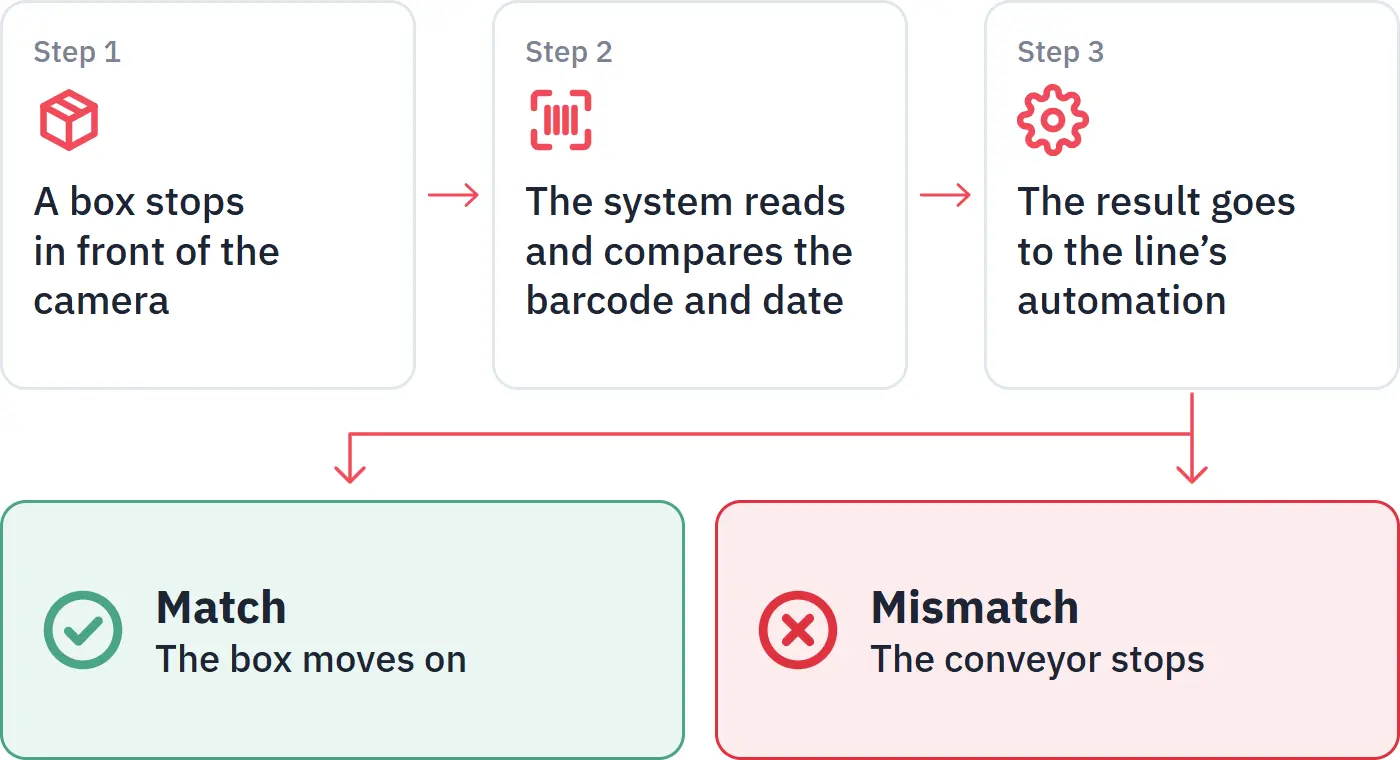
A label inspection system looks simple at first, but the job breaks down into three technical tasks, each following from the one before:
- Detect the moment a box has stopped in front of the camera and the label can be checked.
- Read the barcode and date and compare them with the expected values.
- Pass the result to the line’s automation, so that a labelling error stops the conveyor.
Setting Up an IP Camera for Barcode Reading
To read a barcode, the camera needs a sharp image. The bars are thin, and even in a slightly blurred frame they merge and the code becomes unreadable. Focus has to be set precisely on the label, yet many surveillance cameras only offer automatic focus and exposure.
So the client bought a Tiandy IP camera with manual focus and zoom. It costs only slightly more than cameras without manual adjustment.
The zoom range is limited, so the first step was to find the right distance from the boxes. Together with a member of the client’s staff, we moved the camera closer and further away and adjusted the focus and zoom. Once the barcode and date came through clearly, the plant’s engineer fixed the camera in place.
Our hardware requirements list the camera and computer needed to run the system.
Detecting the Box and Reading the Label
Most of the time the camera sees an empty belt with nothing to read. Then a box enters the frame, at first just cardboard. When the label appears, the box is still moving. Reading it at that moment would mean a blurred image, with part of the label possibly still out of frame.
So a lightweight computer vision model watches the belt first. It checks every frame and decides whether a box has stopped in front of the camera with the whole label in view.
Once the box has stopped, the second step begins. The system checks two things on the label:
- the barcode: it finds and decodes the code, then compares the digits with the expected value;
- the production date: it reads the printed date and compares it as well.
A box passes only if both values match. A barcode from another product is an error. So is a correct barcode with yesterday’s date.
CamContador is not tied to one barcode format.
In other projects, we read barcodes of other standards, QR codes, expiry dates and other label data needed for quality control.
Javi Martínez, Project Manager
Building the Operator Interface
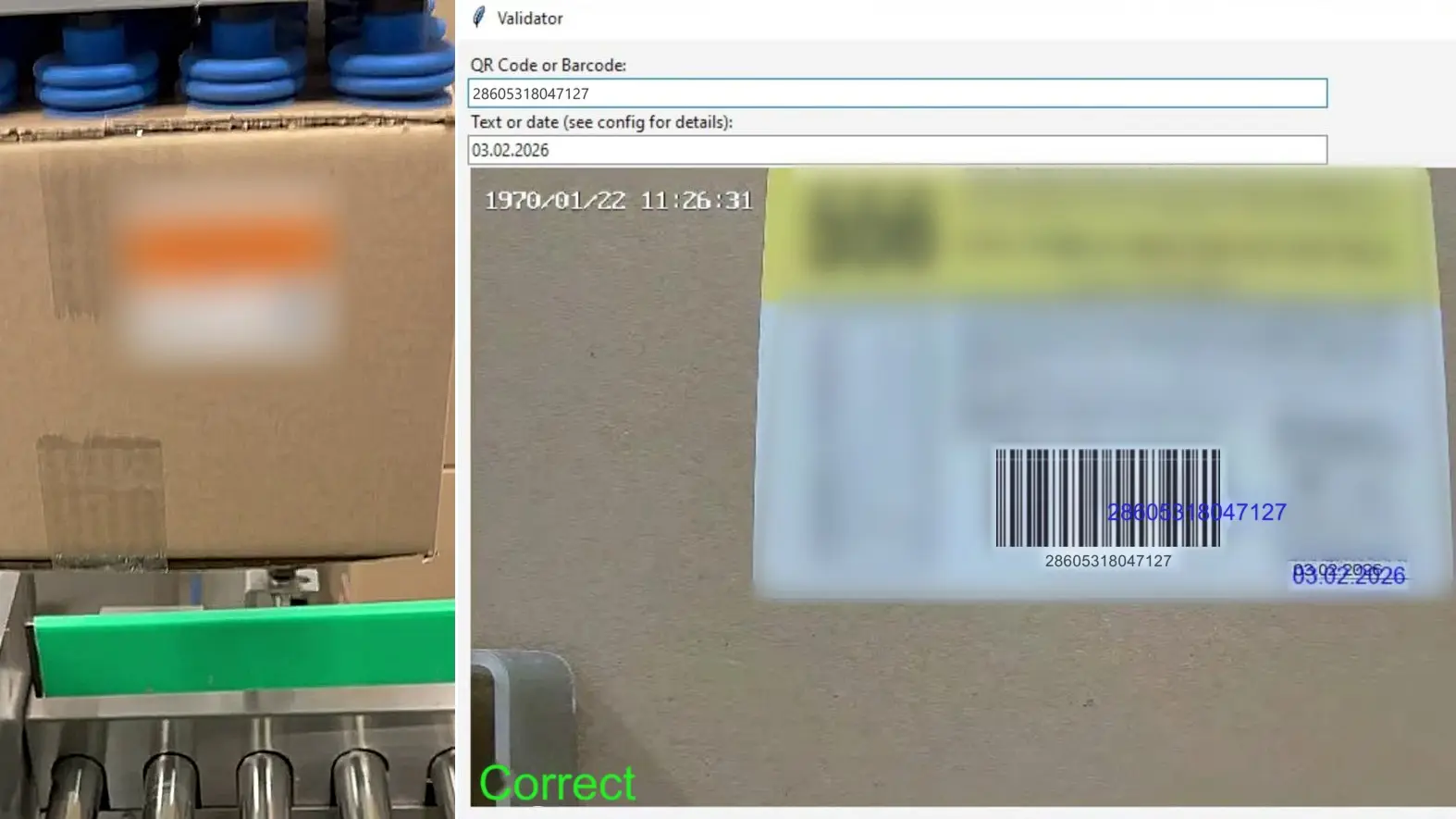
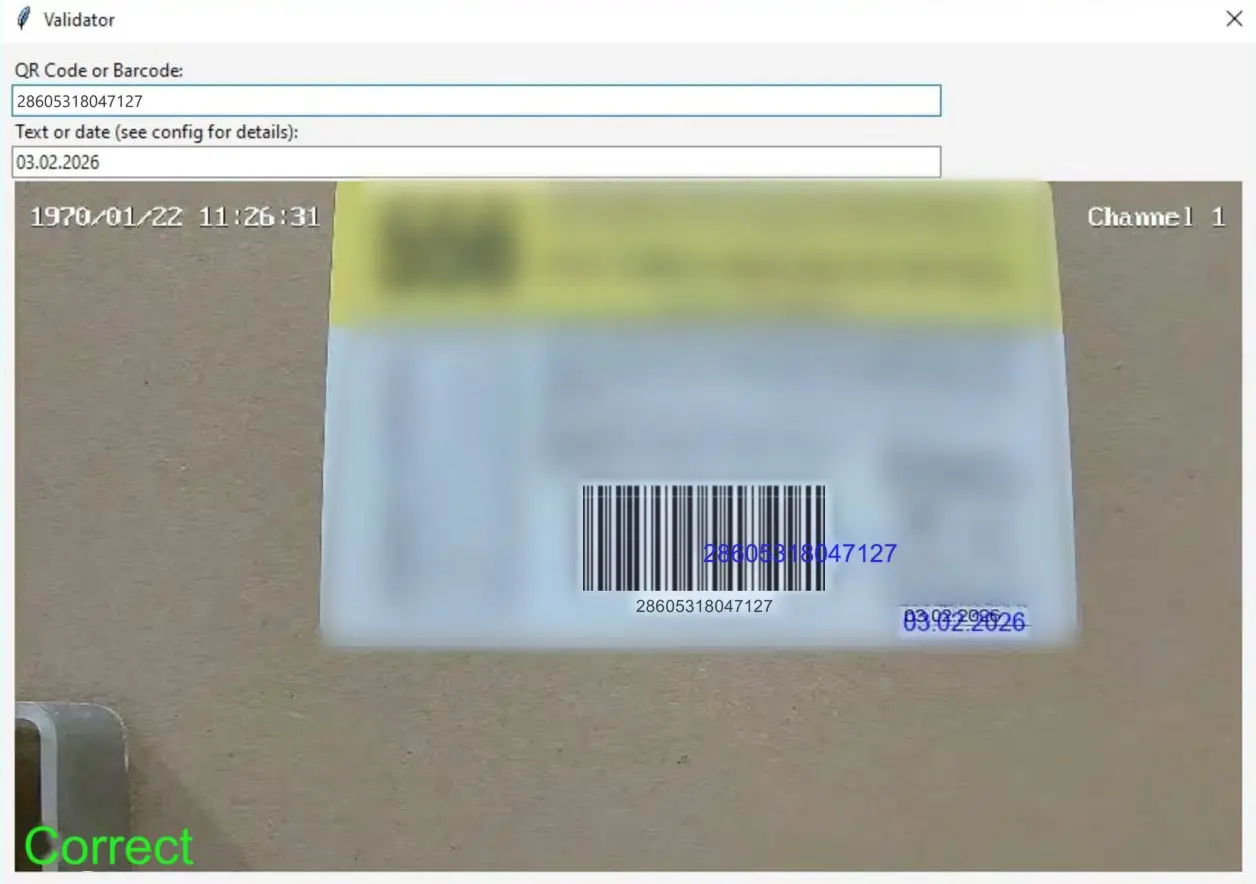
The operator fills in two fields in the program window: the barcode digits and the date. The camera feed runs below them. Over the image, the system shows the data it has recognised and displays the result in large type: a green “Correct” or a red “Incorrect”. The operator does not have to go and look at the box, because the screen shows the cause of the error straight away.
Stopping the Conveyor on a Label Error
Reading the label did not solve the client’s problem on its own. If the system only showed an error on a screen, someone would have to watch the monitor and stop the line by hand, and human error would stay in the process. To make the check work without people, we connected the system to the conveyor’s automation.
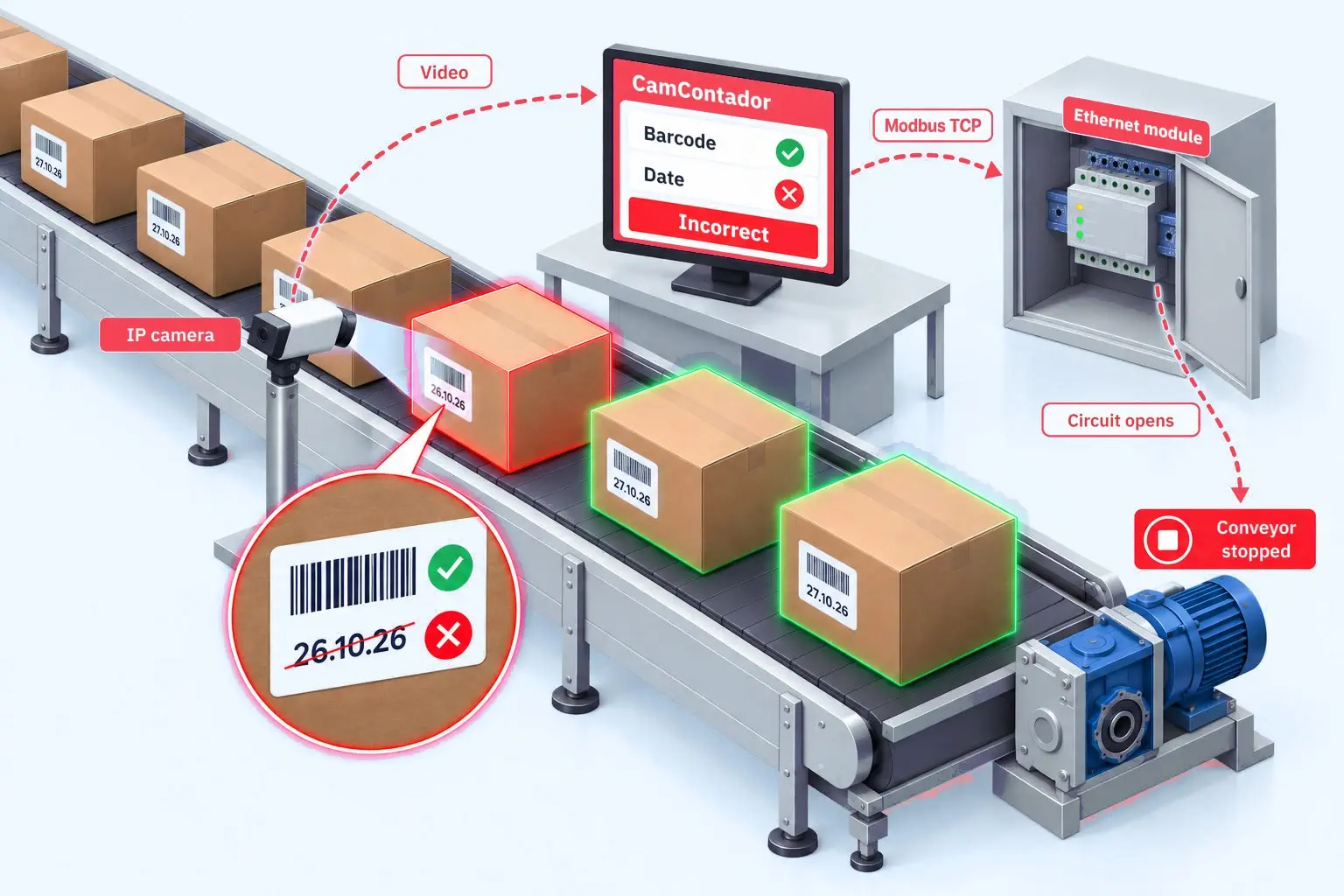
The computer running CamContador is linked over the local network to an Ethernet discrete output module, and the module is wired into the conveyor’s control circuit. When the system finds an error, it sends the module a command over Modbus TCP. The module opens the circuit and the conveyor stops. The operator fixes the cause and resets the error in the program.
We use the same combination of software and module in other projects. On an aluminium can line, the system stops the conveyor when it spots an upside-down can. When bags are loaded onto a truck, it switches off the belt once the target count is reached. That case study also explains how to choose a module for different production lines.
An Unexpected Problem: Print Streaks Through the Bars
When we started, the client printed the barcode vertically on the label, with the bars running along the print direction. From time to time a pale unprinted streak ran along a bar, thinning it or erasing it altogether.
This happens when a label printer’s consumable nears the end of its life. The printer starts leaving thin pale lines in the direction of printing, and because consumables usually get used to the last, the defect appears more and more often. Anyone who runs thermal label printers will recognise a similar pattern, known as dead dots or printhead dropout.
For a barcode, this is critical. The information sits in the width of the bars, not their length, so one damaged bar changes a digit in the code. The barcode check digit helps detect that error but cannot correct it, so the code simply does not read.
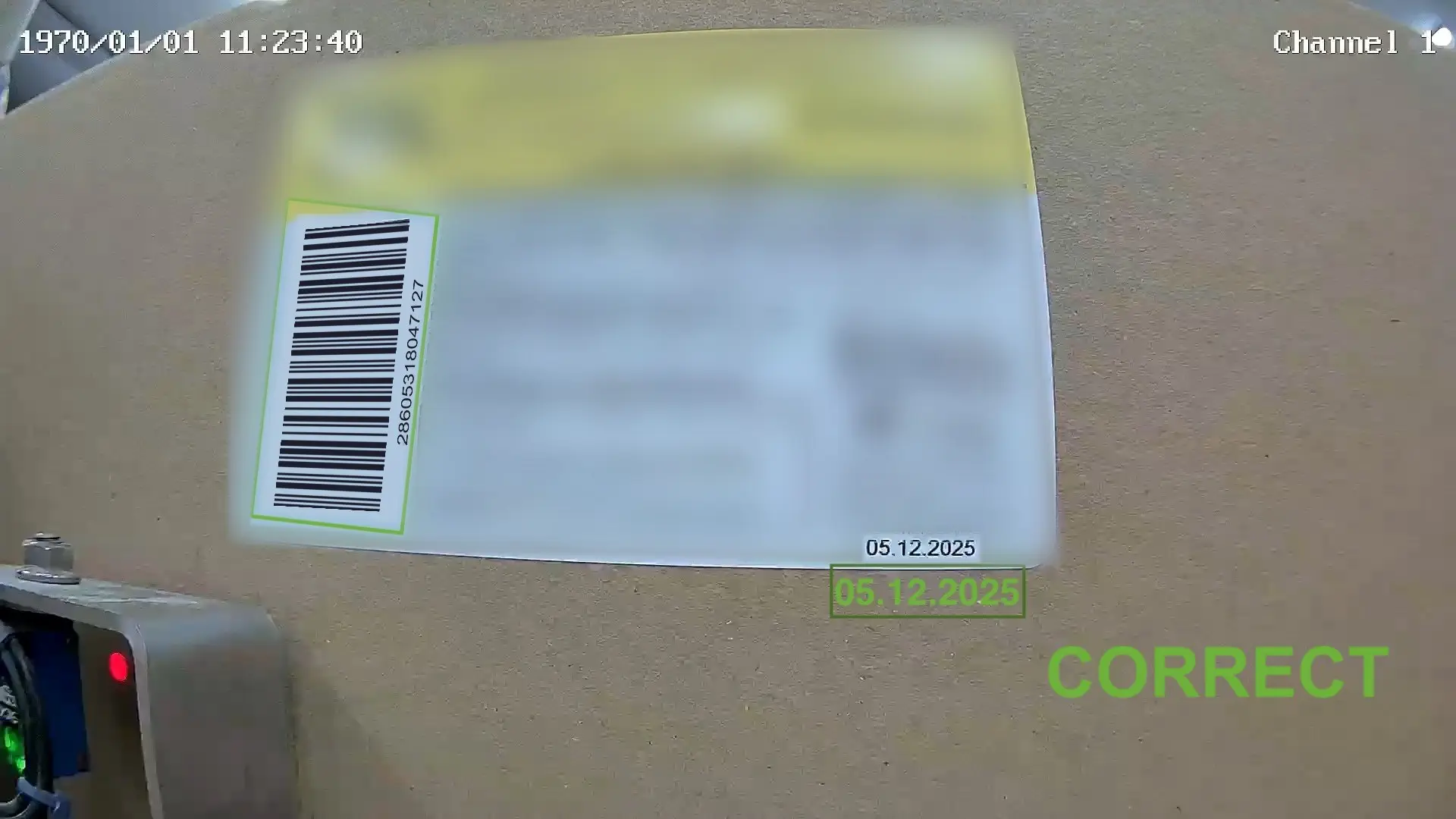
We tried to solve the problem in software. Our developer tested 18 image pre-processing methods: converting the frame to black and white, raising the contrast, reducing grain, blurring. The code became readable, but the chain of steps would have taken 2–3 seconds per label. Boxes move along the client’s line in a steady stream, and the system does not have that time.
In the end, a simple change worked. The client rotated the barcode by 90° in the label layout, so any streaks now run across the bars. A bar may break at one point, but it keeps its width over the rest of its height. Pre-processing was no longer needed, and the system now runs reliably: the streaks no longer interfere with reading.
Results
An employee with a handheld scanner used to check every box on the production floor. Automatic inspection has now replaced that manual check: if the barcode or date does not match the expected values, the line stops.
The system inspects 1,700 boxes a day with 99.9% accuracy. Errors are corrected on the spot, and a box with a wrong barcode or date no longer reaches the customer unnoticed. The main effect is fewer returns and claims from retail chains.
In October 2026, the client began rolling out the same barcode and date check on a second line.
Launch time. Installing, configuring and launching the system took 1 month. We debugged it on a test bench: video from the client’s camera ran as a live stream, and a software simulator stood in for the conveyor. The plant’s line did not stop during debugging.
Team. CamContador had one engineer on the project. On the client’s side, a technical specialist from the plant worked on it.
Cost. Barcode and date inspection counts as one Inspection Item on one line. As of November 2026, that is €1,000 per year or €4,000 for a perpetual licence, and the client chose the perpetual one. Remote setup and launch are included, while the camera and computer are bought separately. To estimate other line configurations, use the calculator on our pricing page.
| Parameter | Detail |
|---|---|
| Accuracy Rate | 99.9% |
| Volume | 1,700 boxes a day |
| Checked Data | ITF-14 barcode and production date |
| On Error | The conveyor stops automatically |
| Integration | Modbus TCP via an Ethernet discrete output module |
| Hardware Requirement | IP camera with manual focus and zoom + computer |
| Launch Time | 1 month |
Need to check barcodes, dates or other label data on your line? Send us 5 minutes of footage. We will run it through the system and show you the result on your own labels, free of charge.
Questions and Answers
ITF-14 is a GS1 barcode for outer cases, the boxes that shops and warehouses receive, and it holds a 14-digit GTIN and nothing else. The first digit shows the packaging level, followed by the product number and a check digit. Warehouses and shops scan it to receive a box without opening it. The code is made of wide and narrow bars, so any distortion of their width during printing can make it unreadable. It has no room for a date, so the date is printed next to it as text, and a camera has to read that text separately. If the date has to be inside the barcode itself, GS1-128 is the usual format for that.
A camera checks every box on the line without an operator, while a handheld scanner checks only the box it is pointed at, and only the barcode. The camera reads the barcode and date, compares them with the expected values and stops the line on an error. If a barcode is genuine but belongs to another product, a handheld scanner will not notice. The camera sees the mismatch immediately.
An IP security camera can do it, and a machine vision camera is not required, because the reading is done by computer vision software on an ordinary computer. Machine vision cameras are a separate class of industrial cameras with interchangeable lenses. For counting products, detecting defects and sorting items by type, a Full HD IP camera with RTSP support is enough. Small codes need a sharp image, so in this project the client chose a Tiandy camera with manual focus and zoom. It costs slightly more than a camera without manual adjustment and several times less than a machine vision camera.
CamContador can check any code or text the camera can see: barcodes of different standards, QR codes, dates, expiry dates and other label text. On the bakery line in this project, it checks the ITF-14 barcode and the production date. We configure recognition for the specific product and packaging.
In this project, launching label inspection on one line took a month. It counts as one Inspection Item: as of November 2026, that is €1,000 per year or €4,000 for a perpetual licence. Before you sign a contract, we check free of charge whether the system can handle your line: send us a video, and we will configure recognition and show you the result. Terms and a calculator are on the pricing page.